Showing posts with label Google Adwords. Show all posts
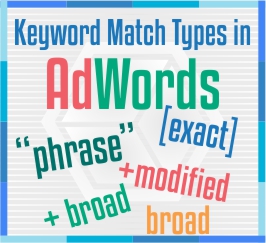
When it comes to Pay Per Click advertisement, it’s all about keywords. a keyword can have different variations. For Google AdWords there are five variations, called “Match Types”. Keyword match types help to ads determine how closely a search query or other input must match your keyword.
One of the most common mistakes of many new and experienced advertisers is not make fully utilizing the available keyword matching options. For each keyword we can assign a match type, which basically determines how broad or narrow a user’s search query will match to the keyword in our AdWords account. Each match type has its advantages and disadvantages which can greatly change the outcome and effectiveness of a campaign. Let’s Look in to it.

Broad Match
Broad match allows your ad to show on similar phrases and close variations of the keyword. Your keywords are placed in Broad Match by default, all you have to do is add in your targeted keywords.
Broad Match keywords will increase the number of clicks you see on your ads, the problem is that a lot of those clicks maybe coming from irrelevant traffic.
Symbol:  None
Pros:
  •          You get the most impression volume
  •          Increase in potential sales due to the increased volume

Cons:
  •          Lot of clicks from Irrelevant keywords

Modified Broad Match

Modified Broad is a relatively new match type that is not obvious it even exists. You can’t automatically change to modified broad in the interface.
The best part about modified broad is it won’t trigger to those extreme cases and word order is not important. You can modify just one or more words in your keyword phrase with the plus sign.
Symbol:  +
Pros:
  •          You still get matched to a wide range of searches
  •          More targeted than straight broad match

Cons:
  •          It’s still a form of broad match, so you will get irrelevant searches.

Phrase Match

This is another match type where it is important to monitor the search term report and exclude words or phrases that you don’t want to trigger for.
Your ad will only appear when a user queries your key phrase using your keywords in the exact order you enter them, but there might be other words either before or after that phrase.
Symbol: “”
Pros:
  •          It works by catching the keyword among a number of words

Cons:
  •          Same as Broad Match

Exact Match

Exact match is the most specific and restrictive of the keyword match types. With this match type, users can only see your ad when they type your exact keyword phrase by itself.
It Allows your ad to show for searches that match the exact phrase exclusively in that order, no other words.
Symbol: []
Pros:
  •          It shows for exact keyword

Cons:
  •          Low search volume

Negative Match

Negative keywords are phrase and exact match keywords in reverse. With negative keywords, you instruct the search engines what you don’t want to show up.
Your ads will not show if a search term contains the keyword you defined as negative.
Symbol: -
Pros:
  •          Exclusion of irrelevant traffic
  •          Improvement of the overall click-through rate (CTR)

Google AdWords Match Types - How to Use Keyword Match Types

When it comes to Pay Per Click advertisement, it’s all about keywords. a keyword can have different variations. For Google AdWords there a...
Google AdWords is one of the most popular Way to Reach new customers and grow your business across the globe. By google AdWords you only pay when they click to visit your website or call. AdWords is a self-serving advertising platform, it means any one can create and manage campaigns.
When you’re new to AdWords, there are many things you need to know and understand the about AdWords campaign. This beginner’s guide to Google AdWords aims to provide some basic terminology and it helps you to get started with your new AdWords campaign.


Types of Google AdWords Campaing
Advertising with AdWords starts with creating a campaign. The campaign type determines where customers will be able to see your ads, but you make this more specific by targeting your ads. Camping types Includes

Search Network with Display Select
Search Network with Display Select campaign type is a combination of “Search Network only” and “Display Network only” AdWords campaign types. With this option you get the best of both worlds–your ads can show with search results on the Search Network, and in relevant placements within the Display Network.
Search Network only
Search Network Only campaign type in Google AdWords, your ads will show on Google’s Search Network next to the search results and its search partner sites.
Display Network only
Display Network Only campaign type only allows advertisers to display ads across Google’s Display Network, it includes over a million different sites.
Shopping
Shopping Campaigns are a type of AdWords campaign that display Product Listing Ads on a Google search results page, in a box separate from AdWords text ads. It will display on Google search network and its search partner sites.
Video
Video Campaigns allows streaming video content on YouTube and across the Google Display Network.
Universal App Campaign
Universal App Campaign ads will be eligible to appear across Google's properties. It includes Google Search and Google Play, as well as our search partners, the Google Display Network.
Basic Terminology
Keywords: The keywords you choose are used to show your ads to people. your ad could be eligible to appear based on the similarity of your keywords to the person's search terms, as well as your keyword match types
Impressions: Each time your ad appears on Google or the Google Network, it's counted as one impression. An impression is counted regardless of whether the search user click the ad or not.
CPM: Cost Per Impression, the amount of advertiser pays on the 1000 impression their ad.
CPC: Cost Per Click, the amount an advertise willing to spend on each click. You will be charged no more than maximum bid for the keyword that will appear.
ACPC: Actual Cost Per Click, the amount of pay on each ad click.
AVG CPC: Average Cost Per Click, the average amount pays for click on your ad.
CTR: Click Through Rate - percentage of ad impression that results in a click. CTR is the number of clicks that your ad receives divided by the number of times your ad is shown expressed as a percentage
Conversions: A conversion happens when someone clicks your ad and then takes an action that you’ve defined as contact forms being submitted, Subscribing and any other call to action.
Ad Rank: Ad Rank determines your ad position and whether your ads will show at all. Ad Rank is calculated using your bid amount, the components of Quality Score and the expected impact of extensions and other ad formats.
Quality Score: Quality score is an estimate of the quality of your ads, keywords, and landing pages.
Different Match Types
Each match type will trigger your ad to show for a customer's search in different ways.

Broad match: Broad match is the default match type that all your keywords are assigned.
Broad match modifier: Ads may show on searches that contain the modified term, in any order.
Phrase match: Ads may show on searches that are a phrase, and close variations of that phrase.
Exact match: Ads may show on searches that are an exact term and close variations of that exact term.
Negative match: Ads may show on searches without the term.

Ad extensions
A feature that shows extra business information with your ad, like an address, phone number, store rating, or more webpage links.


Location: Add a map pin, navigation assistance and a call option to your ad.

Sitelinks: Add links to help people find what they’re looking for

Call: Give your ad a call button, let people click a button to give you a phone call.

App: Show a link below your ad text that sends people to the app store or begins downloading your app

Reviews: Showcase positive, third-party reviews from reputable sources.

Callouts: Add descriptive text to your ad to help people learn more about what you have to offer.

Structured snippets: structured snippets show additional landing page details automatically with your ad on Google search

Google AdWords - The Beginner’s Guide to Google AdWords

Google AdWords is one of the most popular Way to Reach new customers and grow your business across the globe. By google AdWords you only p...
Hello Guys, To day we will talk about keyword match types in google adwords. Keyword match types are something that you really need to consider before actually setting up your PPC campaigns. While bidding the ads for certain keywords, you need to choose the right match type that accurately specifies to Google for which keyword searches you want your ads to be matched. Defining the keyword match type in a Google Adwords campaign can make the difference between the success and failure of a campaign.


They are 5 different keyword match types available in AdWords, Each match type has its own advantages and disadvantages.

  1. Broad Match
  2. Broad Match Modifier
  3. Phrase Match
  4. Exact Match
  5. Negative Match

Broad Match
Broad Match is the default match type, it gives the most control to Google in terms of its ability to match a keyword with a variation, misspelling, or synonym. For this reason a broad match keyword type would display to the wide audience. The wide reach of Broad Match keywords will increase the number of clicks you see on your ads, the problem is that a lot of those clicks maybe coming from irrelevant traffic.
Symbol: None

Broad Match Modifier
Broad match modifier allows your ads to show for more closely related variations of your keywords. Modified broad matches will contain close variations of the keyword, but will not contain synonyms. The modified broad keyword offers some refinement that will restrict your ad to coming up to more accurate terms.
Symbol: +

Phrase Match
A phrase match keyword is displayed within “quotes” in the AdWords interface. With a phrase match the keyword that is provided will appear in all search terms in the order that it is written, with only slight variations such as plural/singular. ads show up to user’s searches which have that particular phrase, synonyms, misspellings, singular/plural forms or close variants of that phrase.
Symbol: “”

Exact Match
When keywords are specified to be exact match; ads show up to the searches that exactly match to the keywords not for any other keywords or variants. It is a good option to use when your AdWords budget is limited, and when you want to maximise the relevancy factor in your campaign.
Symbol: []

Negative Match
Negative match is a match type that is often mistakenly overlooked. If you add a keyword as a negative match, your ad will not show for searches on that keyword. Negative match is a great way to filter out irrelevant clicks in your campaign, helping you to save money.
Symbol: -

I hope that this overview of Google AdWords keyword matching has proved valuable and insightful! If you have any questions, please let me know in the comments

An Introduction to Google AdWords Keyword Match Types

Hello Guys, To day we will talk about keyword match types in google adwords. Keyword match types are something that you really need to con...


Digital Marketing © 2015